
User Guide
This guide is the shortest path from a clean install to an operator-visible Hovel workflow. It covers local workspaces, config layering, module installation, the managed daemon, interactive cli mode, one-shot configured chain throws, validation, artifacts, payload inventory, and sessions.
Hovel is for authorized security testing and lab validation. Use the example modules for public demos and local learning; they exercise orchestration without touching a real target.
Concepts
| Term | Operator meaning |
|---|---|
workspace |
Local state directory containing daemon metadata, SQLite state, artifacts, throw records, and session history. |
operation |
Durable work context. Targets belong to the operation and can be reused by chains inside it. |
chain |
Ordered workflow inside an operation. A chain has module steps, chain config, validation state, logs, and throw history. |
target |
Operation-owned asset such as mock://router-01, with target-scoped configuration. |
throw |
Replayable execution of a reviewed chain against selected targets. |
chain KV |
Fresh, throw-local string handoff used by ordered modules. It is mutable only during that throw and becomes a read-only chain-kv.json artifact afterward. |
session |
Live post-exploitation stream owned by the daemon and reached through session commands. |
Install Hovel
The normal operator install is through PyPI. The hovel wheel contains the Go binary for the current platform and does not download anything at install time or first run.
pipx install hovel
hovel status
Python module authors install the SDK separately:
pipx install hovel
python -m pip install hovel-sdk
The hovel package includes no modules. Install only modules you trust; module install scripts and module execution are arbitrary code execution by design.
Configure Hovel
Hovel config is YAML. Built-in defaults are overridden by global config, then workspace config, then a single explicit --config file.
$XDG_CONFIG_HOME/hovel/config.yaml
$HOME/.config/hovel/config.yaml
<workspace>/config.yaml
hovel --config ./lab.yaml ...
apiVersion: hovel.dev/v1alpha1
kind: HovelConfig
modules:
  searchPaths:
    - ./modules
    - ~/.local/share/hovel/modules
cache:
  enabled: true
runtime:
  python:
    pythonBuildStandalone:
      release: 20260610
Hovel is offline-ready. It never contacts internet URLs during daemon startup, listing, validation, throws, or runtime execution. Network access happens only when you explicitly install from a URL, use a URL index, bulk-install a URL manifest or URL sources, or allow managed Python setup during install.
Install Modules
Modules are distributed as .tgz packages. Install from disk, absolute path, HTTPS URL, a local package reference, an index-backed reference, a bulk manifest, or a linked development directory.
hovel module install ./squatter-0.4.3.tgz
hovel module install /opt/hovel/modules/ms17-010-survey-1.0.0.tgz
hovel module install https://github.com/vibepwners/hovel/releases/download/v0.4.3/squatter-0.4.3.tgz --sha256 ...
hovel module install ms17-010-survey
hovel module install squatter@0.4.3
hovel module bulk-install https://github.com/vibepwners/hovel/releases/download/v0.4.3/module-install-set.yaml
hovel module bulk-install ./lab-modules.yaml
hovel module install --link /home/me/dev/my-module
hovel module available
hovel module installed
For module install name, Hovel installs the newest matching local package before consulting configured module indexes. Local resolution checks the download cache, configured package roots and archives, and the source-tree dist/modules/module-index.yaml when it exists. Exact name@version references use the same local-first path. Use --index to add an index for one install when it is not already configured. The default install target is the active workspace. Use --global for a user-level install. Workspace modules win over global modules. Reinstalling the same name@version with a different SHA-256 requires --replace. Remote bulk-install manifests are HTTPS YAML files; relative sources inside them resolve against the manifest URL.
apiVersion: hovel.dev/v1alpha1
kind: ModuleInstallSet
modules:
  - source: https://github.com/vibepwners/hovel/releases/download/v0.4.3/squatter-0.4.3.tgz
    sha256: ...
  - source: ./ms17-010-survey-1.0.0.tgz
  - source: ./ms17-010-exploit-1.0.0.tgz
Installed packages are recorded in module-lock.yaml only after the install process completes. Cached downloads stay visible through module available for offline reinstall until explicitly cleaned; they are not installed modules.

Start Hovel From Source
All build, test, run, and docs commands go through Aspect CLI. The developer workspace defaults to ./.hovel; set HOVEL_WORKSPACE when you want a separate local workspace.
# Build staged example modules and launch the interactive CLI.
aspect hovel cli

# Inspect daemon state for the current dev workspace.
aspect hovel status

# Wipe local state and relaunch from a clean workspace.
aspect hovel init
aspect hovel cli launches hovel cli and auto-starts or attaches to a local daemon for the workspace. The daemon owns module processes, throw plans, confirmation records, artifacts, installed payload inventory, logs, and sessions.
Connect Across Containers
Run the daemon explicitly when the Hovel front end and workspace engine live in separate containers. The daemon may keep its workspace in a mounted volume while clients connect using the service name on a protected container network:
# Daemon container. The advertised endpoint must be dialable by clients.
hovel daemon serve --workspace /srv/hovel \
  --listen tcp://0.0.0.0:9090 \
  --advertise tcp://0.0.0.0:9090=tcp://hoveld:9090 \
  --allow-insecure-tcp

# CLI container.
hovel --daemon-endpoint tcp://hoveld:9090 \
  --allow-insecure-daemon \
  cli --workspace /client-state
TCP is read-only unless the server explicitly selects insecure-full. The --allow-insecure-tcp shortcut does that for every TCP listener; the client must separately acknowledge it with --allow-insecure-daemon. This mode is plaintext and unauthenticated. The acknowledgements prevent accidental use but provide no network security, so never publish the port or put it behind a public reverse proxy. Use container firewalling or an otherwise isolated private network.
For persistent deployments, configure individual daemon.listeners and daemon.client entries instead of repeating flags. The complete YAML and environment forms, precedence rules, multi-listener behavior, wildcard and ephemeral-port advertisement rules, and security model are in Daemon RPC Transport.
Throw A Saved Chain
One-shot mode is for scripts, CI, demos, and operators who want to execute a durable configured chain file without entering the prompt. It loads the chain file, creates the same review surface as interactive execution, records a confirmation, runs the modules, persists events, and exits.
aspect hovel throw -- demo/chains/mock-survey-exploit.chain.yaml --now--now skips the typed yes prompt, but it is still an explicit recorded confirmation bypass. It does not skip planning, validation, guardrails, event recording, artifacts, or throw records.


Build A Chain Interactively
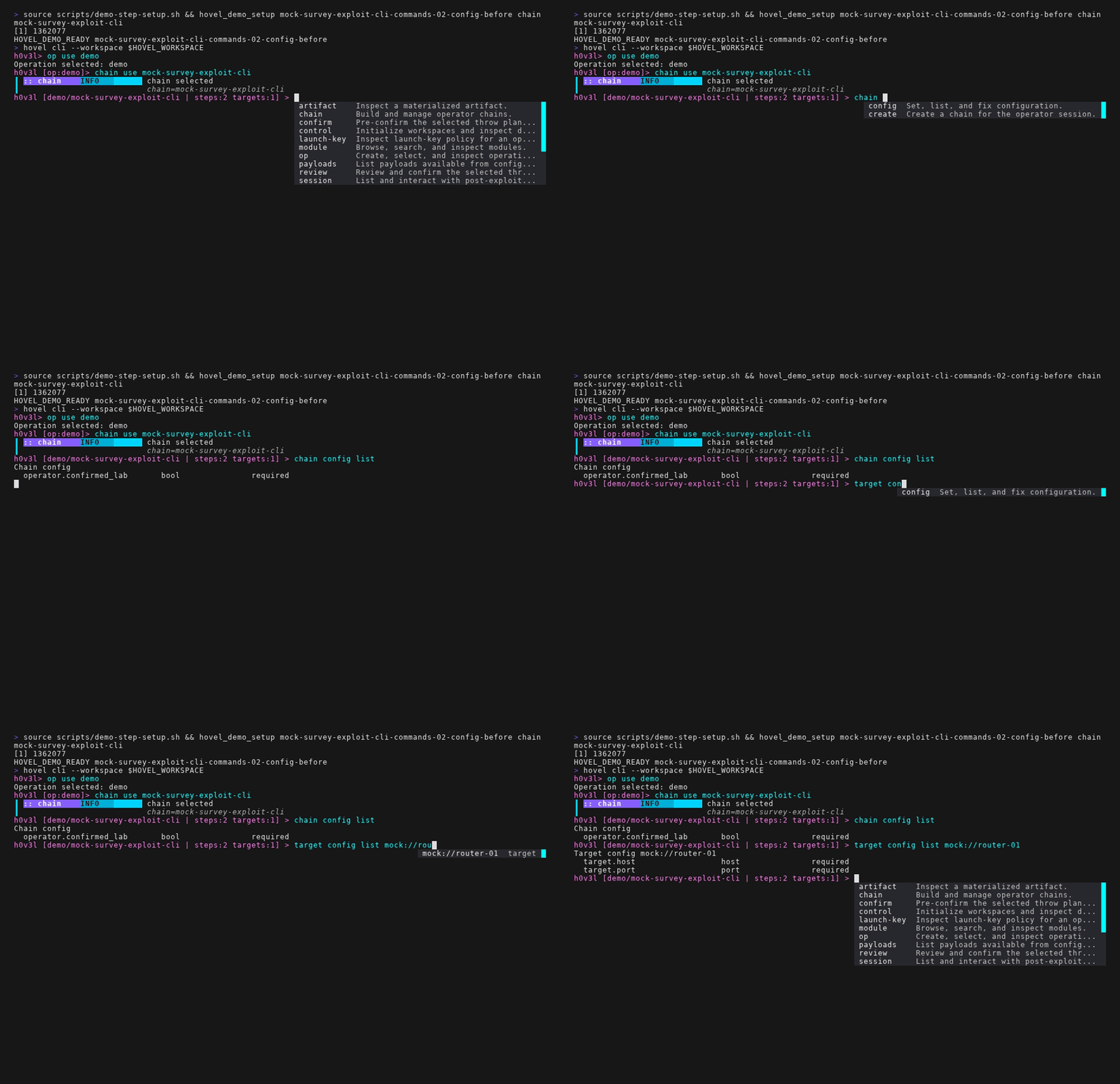
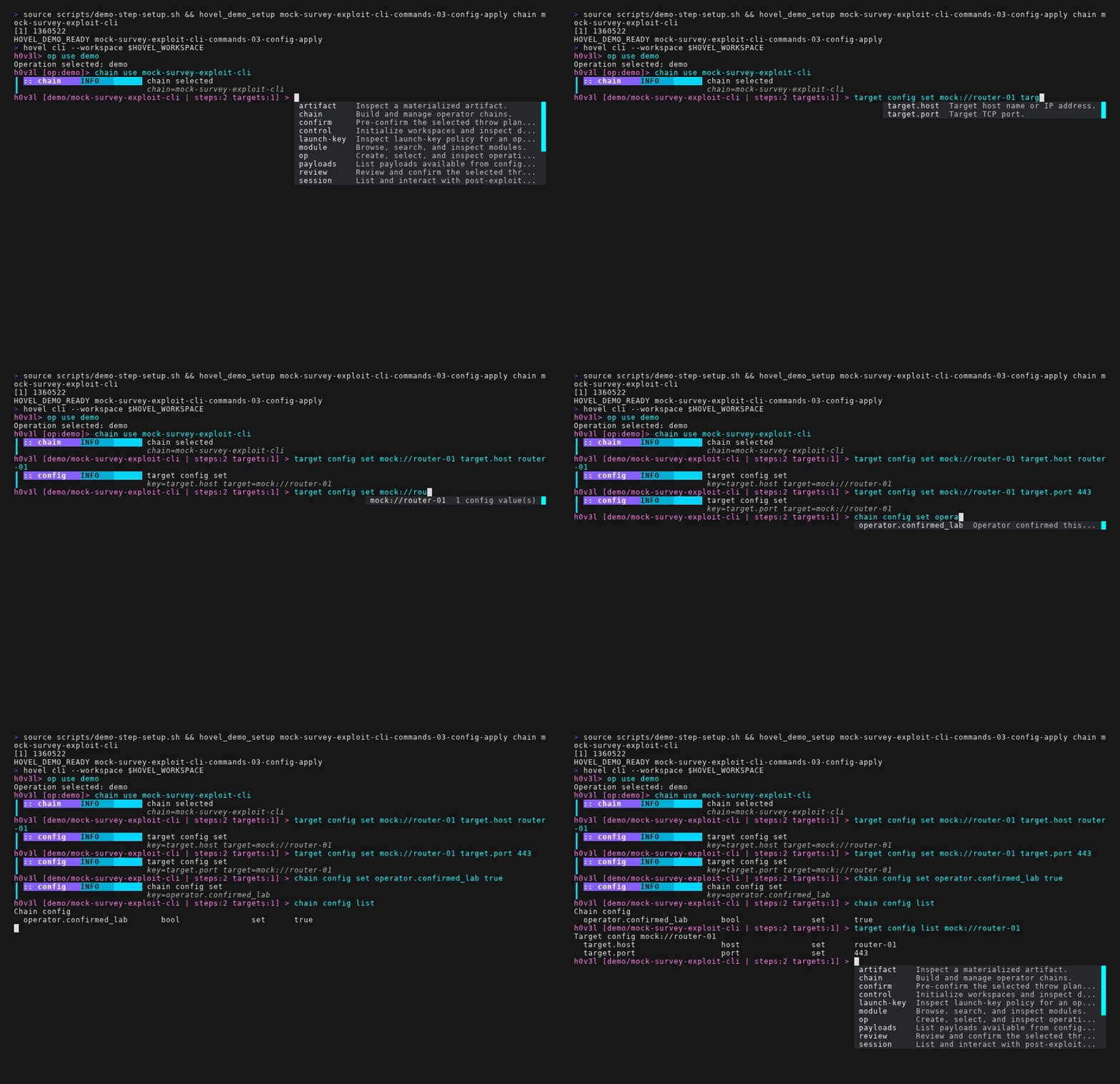
The interactive flow starts by selecting an operation, creating or selecting a chain, adding module steps, adding operation-owned targets, configuring required values, validating, and throwing.
h0v3l> op use demo
h0v3l [demo]> chain create mock-survey-exploit
h0v3l [demo/mock-survey-exploit] > chain add mock-survey-go
h0v3l [demo/mock-survey-exploit] > chain add mock-exploit-session-go
h0v3l [demo/mock-survey-exploit] > target add mock://router-01
h0v3l [demo/mock-survey-exploit] > chain config list
h0v3l [demo/mock-survey-exploit] > target config list mock://router-01
h0v3l [demo/mock-survey-exploit] > target config set mock://router-01 target.host router-01
h0v3l [demo/mock-survey-exploit] > target config set mock://router-01 target.port 443
h0v3l [demo/mock-survey-exploit] > chain config set operator.confirmed_lab true
h0v3l [demo/mock-survey-exploit] > chain config list
h0v3l [demo/mock-survey-exploit] > target config list mock://router-01
h0v3l [demo/mock-survey-exploit] > chain validate
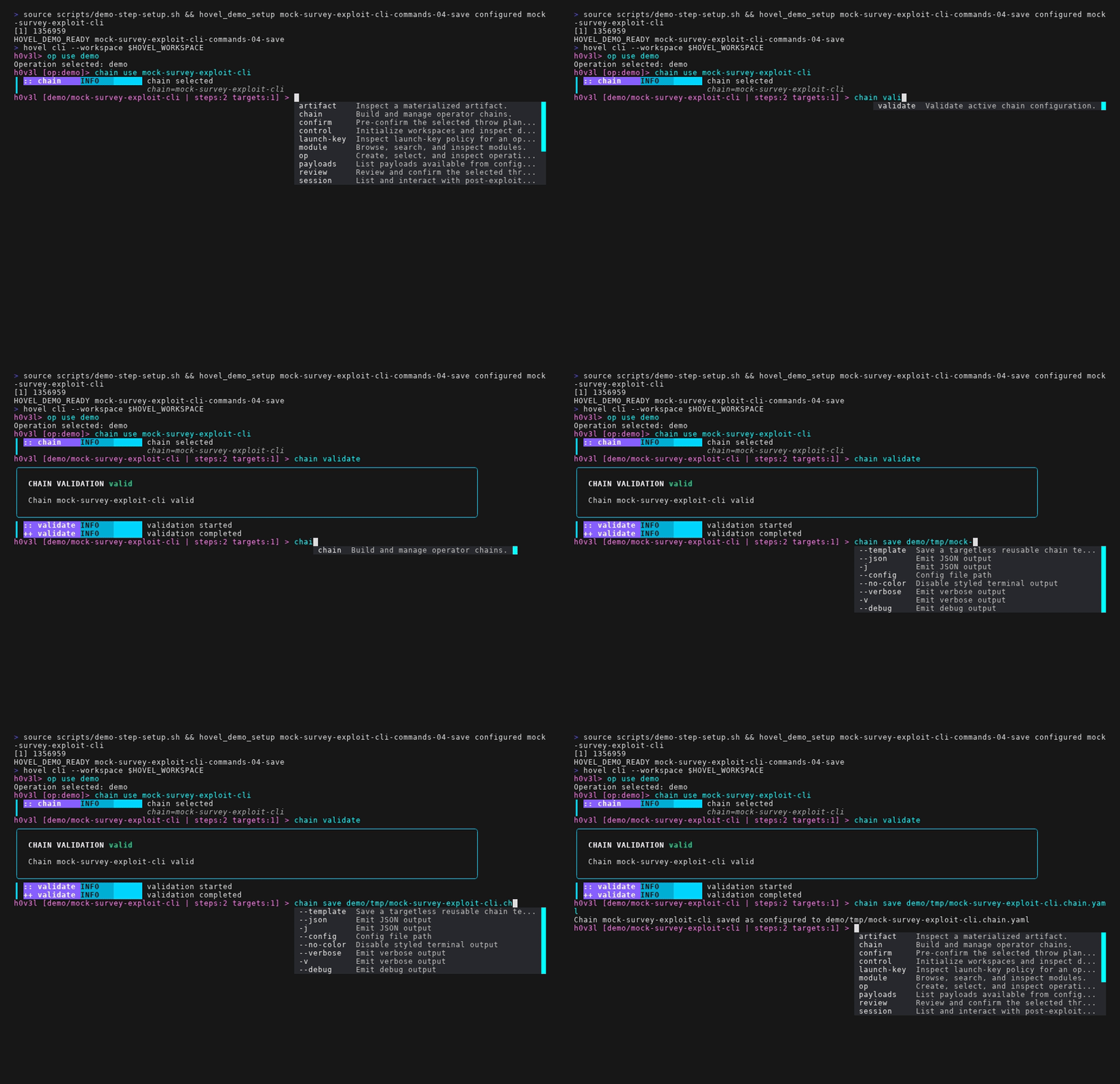
Targets are operation assets. Adding a target while a chain is active also binds it to that chain; adding a target in operation context leaves it available for later binding to any chain in the operation.

Review And Throw
review, confirm, and throw share the same planning path. review displays the plan and records a typed confirmation without execution. confirm records pre-confirmation and stops. throw starts execution after an existing confirmation, an inline typed yes, or an explicit --now bypass.
h0v3l [demo/mock-survey-exploit] > review
h0v3l [demo/mock-survey-exploit] > throw
A confirmation is tied to the reviewed plan. Changing steps, targets, configuration, or planned chain-KV bindings changes the plan hash and requires another review. A required dynamic binding means an earlier module must produce that key during this throw; Hovel never reuses a prior throw's snapshot.
Inspect Results
After a throw, inspect the durable records instead of treating terminal text as the source of truth.
h0v3l [demo/mock-survey-exploit] > throw list
h0v3l [demo/mock-survey-exploit] > throw inspect <throw-id>
h0v3l [demo/mock-survey-exploit] > artifact list
h0v3l [demo/mock-survey-exploit] > artifact inspect <artifact-id>
Every throw using the chain-KV runtime records a chain-kv.json artifact containing the final revision and string entries. It is read-only evidence: inspect it through the ordinary artifact commands, and start another throw to obtain a fresh empty store. The mock survey/exploit pair demonstrates this by publishing survey/{target}/port and reporting whether the exploit used explicit config or the surveyed value.
Use an artifact-producing mock exploit chain when demonstrating artifacts. The session-oriented mock exploit is better for session videos; the non-session mock exploit is better for findings, the KV handoff, and artifact inventory. See Chain KV Handoffs for naming, limits, and module APIs.
Operate A Session
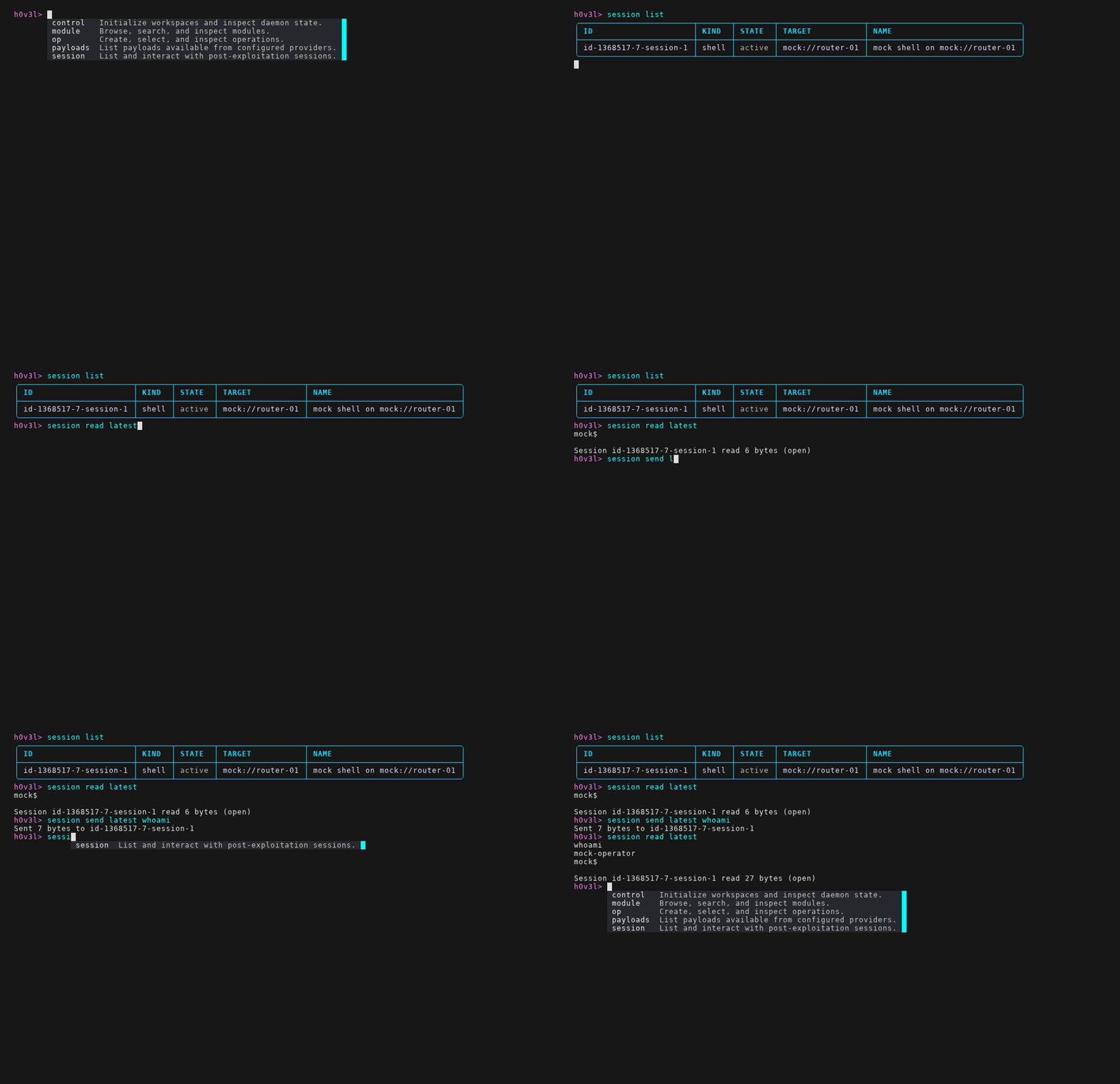
A session-capable exploit returns a session reference. The daemon keeps the module process alive and brokers reads, writes, tails, connects, and closes through the session command group.
h0v3l [demo/mock-survey-exploit] > session list
h0v3l [demo/mock-survey-exploit] > session read latest
h0v3l [demo/mock-survey-exploit] > session send latest whoami
h0v3l [demo/mock-survey-exploit] > session read latest
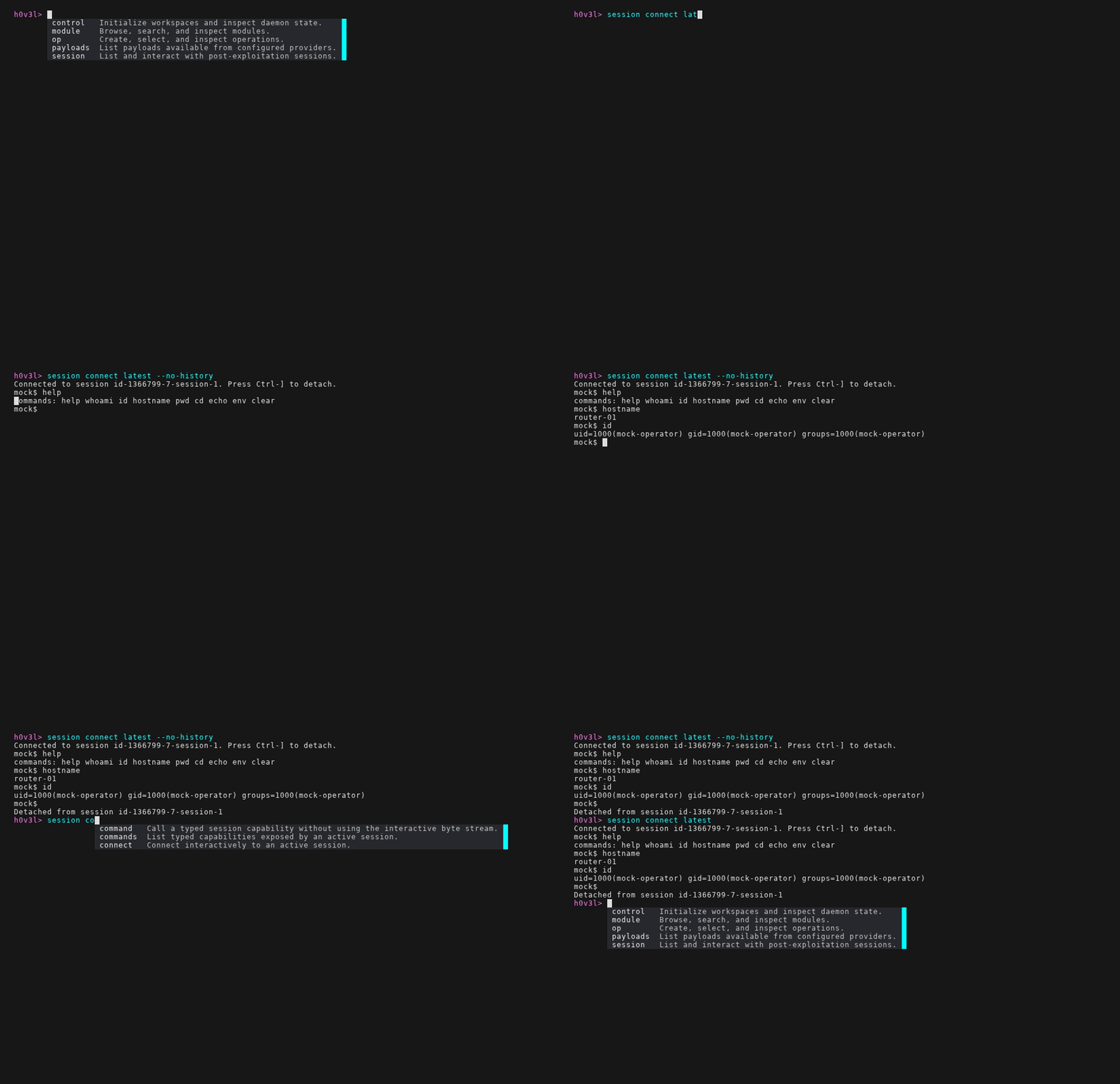
h0v3l [demo/mock-survey-exploit] > session connect latest --no-history
h0v3l [demo/mock-survey-exploit] > session close latest
session connect attaches interactively inside hovel cli or from a direct hovel session connect command. Use session read, session tail, and session send for non-attached request/response interaction.
Provider-backed agent sessions can also expose typed commands that do not write to the interactive byte stream. Discover them with session commands or the session capabilities alias, then call one with session call:
h0v3l [demo/mock-survey-exploit] > session capabilities latest
h0v3l [demo/mock-survey-exploit] > session call latest process.list
h0v3l [demo/mock-survey-exploit] > session call latest registry.query --arg HKLM --arg "SOFTWARE\Microsoft\Windows NT\CurrentVersion" --arg ProductName
Typed command lists render as tables with safe/write/destructive effect labels. If a provider command returns JSON on stdout or stderr, Hovel pretty-prints that JSON in human output and still exposes the raw structured result through --json.
Payload Inventory
Payload commands answer what payloads are available or installed. Session commands answer what is connected now. Installed payload records are created only from explicit provider or module descriptors, never inferred from log text.
h0v3l [demo/mock-survey-exploit] > payloads available
h0v3l [demo/mock-survey-exploit] > payloads installed
h0v3l [demo/mock-survey-exploit] > payloads inspect p1 --events
h0v3l [demo/mock-survey-exploit] > payloads capabilities p1
h0v3l [demo/mock-survey-exploit] > payloads call p1 wininfo
h0v3l [demo/mock-survey-exploit] > payloads call p1 process.list
h0v3l [demo/mock-survey-exploit] > payloads getfile p1 C:\Windows\win.ini
h0v3l [demo/mock-survey-exploit] > payloads putfile p1 ./note.txt C:\Windows\Temp\note.txt
h0v3l [demo/mock-survey-exploit] > payloads cmd p1 whoami
h0v3l [demo/mock-survey-exploit] > payloads mark-removed p1 --reason rebuilt
payloads capabilities is an alias for payloads commands. payloads call is the provider-neutral path for typed actions; payloads getfile, payloads putfile, and payloads cmd are compatibility shortcuts for common Squatter commands. Use payload inventory demos only with fixtures that create deterministic installed payload records. Avoid implying that a log line, artifact name, or connection attempt creates inventory.
Save And Reuse
Once an interactive chain is configured, save it when it should be reviewed, shared, or run later from one-shot mode.
h0v3l [demo/mock-survey-exploit] > chain save mock-survey-exploit.chain.yaml
h0v3l [demo/mock-survey-exploit] > chain load mock-survey-exploit.chain.yaml
A configured chain file must contain the steps, chain-level values, targets, and per-target configuration needed to reconstruct the review surface without hidden prompt state.




Write Or Register A Module
Module authors should start with the language-specific examples, keep metadata paths cheap and side-effect free, declare every operator-controlled value, and use the SDK logging rail instead of stdout. Package finished modules as .tgz archives with a hovel-module.yaml manifest.
hovel module install --link "$PWD/modules/examples/go/mock_survey"
hovel module installed
hovel module inspect mock-survey-go