
Front Ends
Front ends are adapters over application services. They must share validation, planning, execution, structured logging rail subscriptions, scope guardrails, and audit behavior.
Hovel's implemented operator surfaces are cli mode for an interactive prompt shell, one-shot chain-file execution for shell workflows, daemon management, and an MCP agent slice with stdio and streamable HTTP transports. hovel tui remains an explicit not-implemented role. The product target also includes a full-screen TUI, REST/OpenAPI, and fuller MCP resources/prompts. As those adapters land, they must attach to the same daemon and use the same application services.
The production entrypoint is the hovel mono-binary. Top-level subcommands select the front-end or daemon role:
hovel cli ...
hovel throw <chain-file>
hovel daemon ...
hovel mcp ...              # agent front end
hovel tui ...              # not implemented yet
The root implementation also exposes compatibility and developer entrypoints such as shell, command, run, direct registry roots, init, and status. They should remain documented as compatibility/developer affordances rather than the durable product contract. The shell-facing product surface should be deliberately narrow: daemon management, help, and one-shot execution of a saved chain file.
The hovel mcp role is specified in MCP and Agent Operation. It is an agent-facing front end over the same daemon state and safety model, not a privileged execution shortcut.
All implemented front ends attach to the stable daemon RPC where they need shared workspace state. They may use the managed local Unix socket or an explicitly configured TCP endpoint, including a daemon in another container. The daemon RPC is specified in Daemon RPC Contract and described by reference/daemon-rpc.openapi.json.
Terminology
These terms are normative:
climode is an interactive prompt shell. It takes over the terminal like a REPL, but it is not a full-screen TUI.- One-shot mode throws a saved chain file from the shell, prints output, and exits.
tuimode is the planned full-screen terminal UI. The top-level command exists today only as an explicit not-implemented role.daemonmode runs or inspects the engine role directly.
The old phrase "CLI command mode" should be avoided. Use cli for the interactive prompt shell and "one-shot chain-file execution" for shell throws.
One-Shot Mode
One-shot mode is for scripts, automation, CI, demos, and cases where an operator wants to execute a durable chain definition without entering the interactive prompt.
One-shot rules:
- Invoked as
hovel throw <chain-file>. - Loads a configured chain YAML file and produces the same throw plan as interactive
throw. - Displays the same final configuration review as interactive
confirmandthrow. - Requires the operator to type
yesbefore execution unless--nowis passed. - Records a confirmation record for both typed confirmations and
--nowbypasses. - Persists throw plans, confirmation records, events, artifacts, throw records, and final state.
- Uses
--jsonfor structured output. - Uses
--no-colorfor simple terminals and logs. - Does not rely on or mutate another client's active operation or chain selection.
Recommended shell surface:
hovel
  throw <chain-file> [--now] [--workspace <workspace>] [--json] [--no-color]
  daemon
    serve
    status


CLI Mode
cli mode is the first implemented rich operator interface. It starts an interactive prompt shell with command history, completions, contextual help, and styled output. It uses go-prompt for the prompt and completion loop and Lip Gloss for prompt, table, panel, status, and result styling.
CLI mode should be inspired by what operators like about Metasploit: fast discovery, a stable prompt, contextual commands, readable module options, jobs, sessions, and a workflow that lets an operator stay inside the tool while moving from discovery to planning to execution. It should not clone Metasploit command names or behavior wholesale; Hovel should have its own vocabulary around operations, chains, targets, providers, payloads, listeners, sessions, throws, structured events, and artifacts.
Requirements:
- Human-readable output by default.
--jsonfor structured output where useful.--no-colorfor simple terminals.--verboseand--debug.--workspaceselection.- Shell completion.
- Module inspection.
- Operation and chain selection, target setup, and throw execution.
- Artifact, payload, installed payload, and session listing.
- Future service lifecycle control and listener listing.
- Command history, contextual help, and a status-aware prompt.
- Lip Gloss styling for tables, transcript logs, findings, throw status, and prompt output.
- A shared theme package with the TUI.
- go-prompt completion generated from the central command registry.
- Managed daemon lifecycle: attach to an existing daemon if one is running; otherwise start a background daemon owned by the
clisession and shut it down on exit.
Recommended top-level shape:
hovel
  cli
Root role commands such as hovel cli, hovel daemon, and hovel tui remain explicit role selectors. Product docs should not present broad direct aliases such as hovel op ... as the durable shell contract.
Recommended prompt shape:
h0v3l> control init --workspace .hovel
h0v3l> op use redteam-lab
h0v3l [redteam-lab]> chain create mock-exploit
h0v3l [redteam-lab/mock-exploit] > target add mock://target-1
h0v3l [redteam-lab/mock-exploit] > target add mock://target-2
h0v3l [redteam-lab/mock-exploit] > target set create lab
h0v3l [redteam-lab/mock-exploit] > target set add lab mock://target-1
h0v3l [redteam-lab/mock-exploit] > throw
h0v3l [redteam-lab/mock-exploit] > logs
Implemented interactive command surface:
help
control init
control daemon status
op create
op use
op list
op inspect
chain create
chain use
chain rename
chain add
chain validate
chain inspect
chain logs
chain save
chain load
chain list
chain delete
chain config set
chain config unset
chain config list
chain config interactive
add
validate
config set
config unset
config list
config interactive
inspect
logs
rename
module available
module installed
module inspect
module search
target add
target clear
target bind
target unbind
target config set
target config unset
target config list
target set create
target set add
target set remove
target set list
target set inspect
target group create
target group add
target group remove
target group list
target group inspect
throw
confirm
review
throw list
throw inspect
payloads available
payloads installed
payloads inspect
payloads connect
payloads refresh
payloads cleanup
payloads mark-removed
artifact list
artifact inspect
session list
session connect
session tail
session read
session send
session close
exit
quit
The prompt should show workspace, active operation, and active chain context, but should only enter modal flows when the mode is visible in the prompt. When a chain is activated with chain use <chain> or created with chain create <chain>, the prompt includes the selected operation and chain as h0v3l [<operation>/<chain>] >; the chain segment should render in cyan. chain config interactive is a CLI-only prompt wizard layered over the same session configuration calls as chain config set and target config set. It remains inside the active go-prompt session, changes the prompt into config-selection or config-value mode, and switches completions to current menu choices or type-aware values for the key being configured.
CLI mode has two discovery contexts:
- Normal context, with no active chain: root completions focus on setup and navigation, including
control,op,module, and chain lifecycle commands such aschain create,chain use,chain list,chain rename, andchain delete. Active-chain commands such aschain add,chain config,chain validate,chain inspect, andchain logsare hidden from completion until a chain is active. - Chain context, with an active chain: active-chain operations are promoted to root commands.
add <module>,config ...,validate,inspect,logs, andrename <name>are CLI aliases over canonicalchain ...commands or the CLI-only config wizard. Docs, help, and examples should preferchainfor registry-backed commands.
The canonical interactive execution loop is:
- Create or enter an operation with
op create <operation>orop use <operation>. - Create and immediately enter a chain with
chain create <chain>, or enter an existing chain withchain use <chain>. - Add chain steps with
add <module>. - Add one or more operation-owned targets with
target add <target>. - Configure and validate the chain with
config ...andvalidate. - Optionally pre-confirm with
confirm, or rerun an explicit typed review withreview. - Execute the active chain against selected operation targets with
throw. - Persist the chain definition with
chain save <file>when it should be shared or used from one-shot mode.

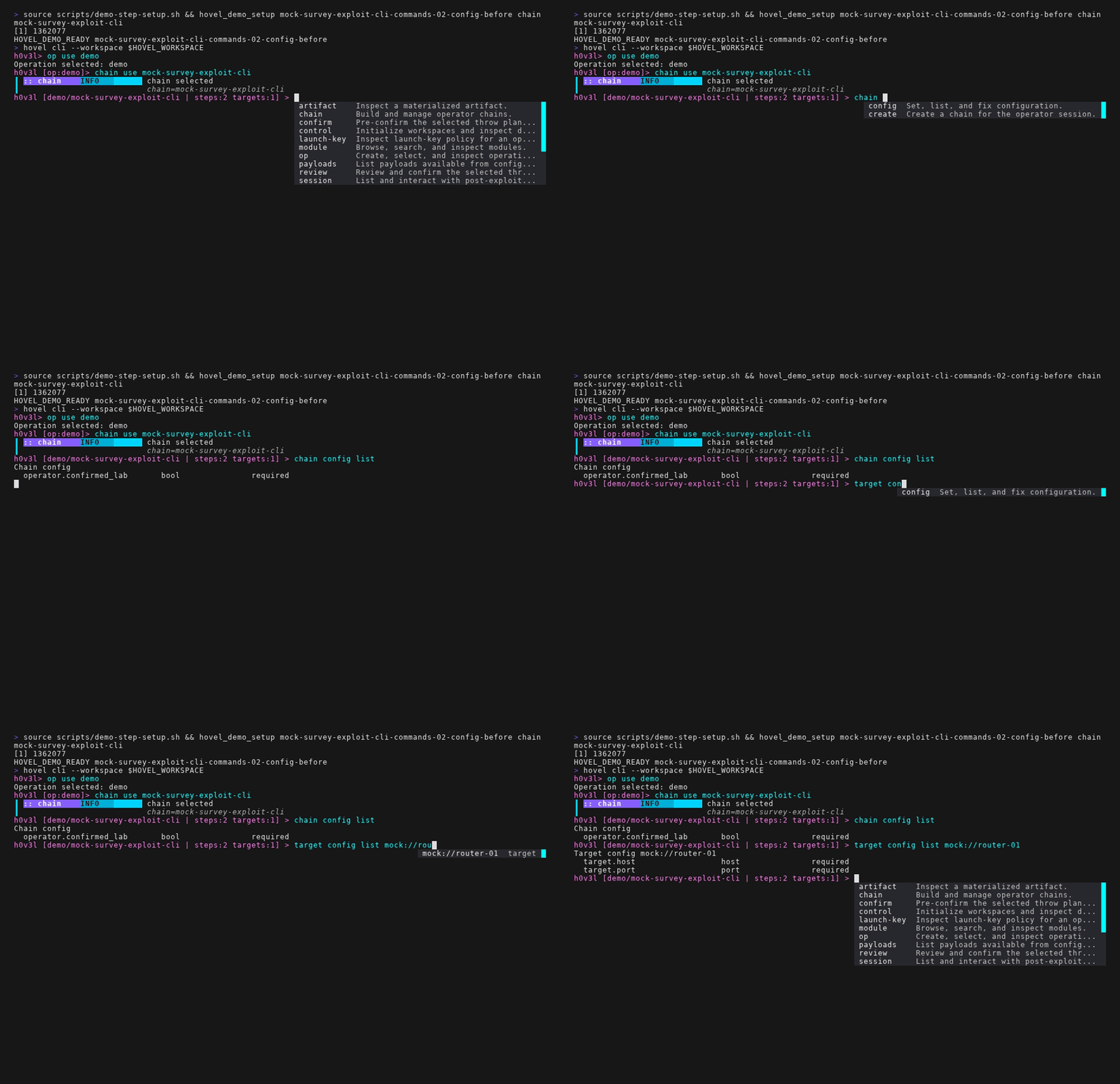
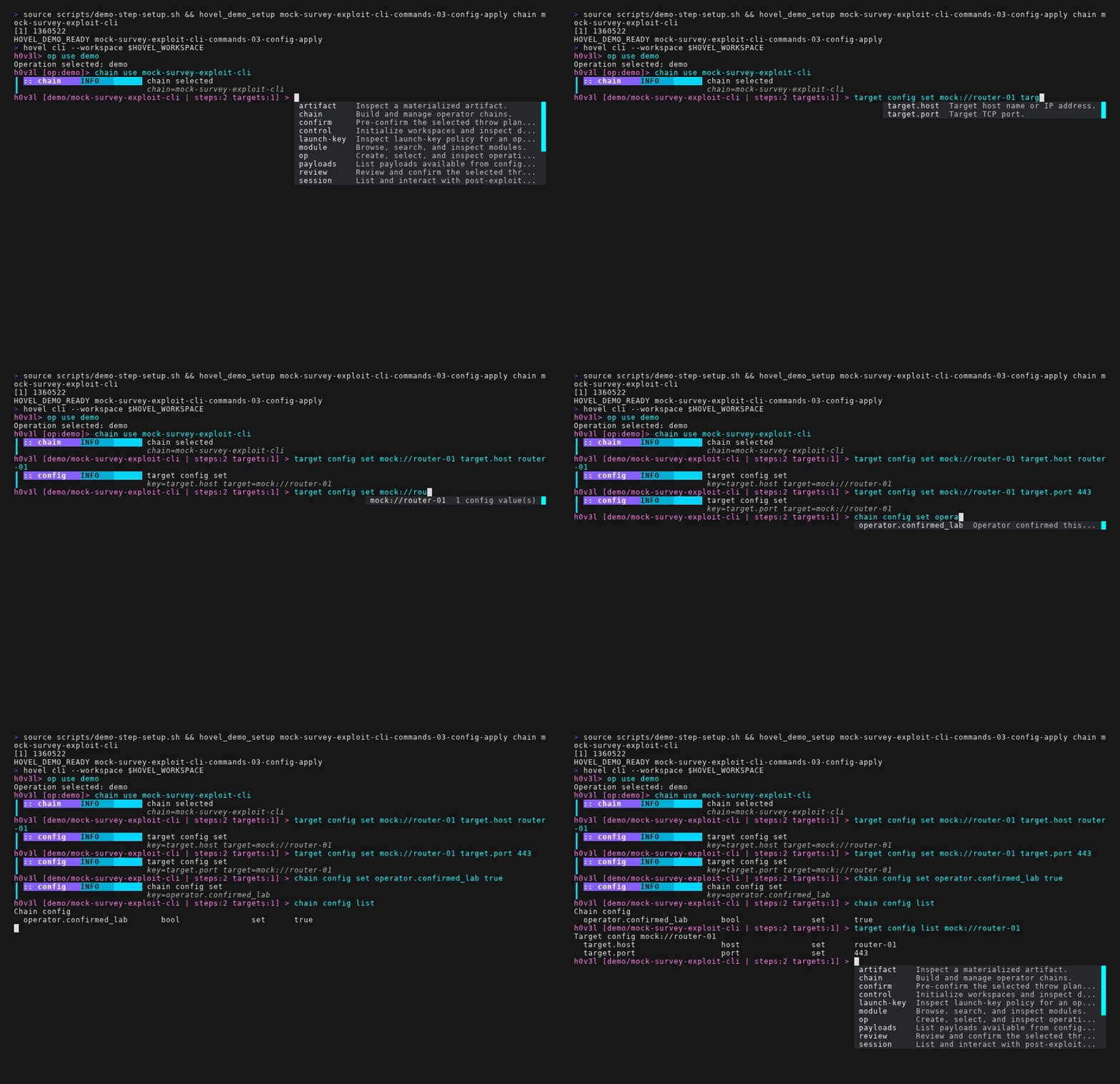
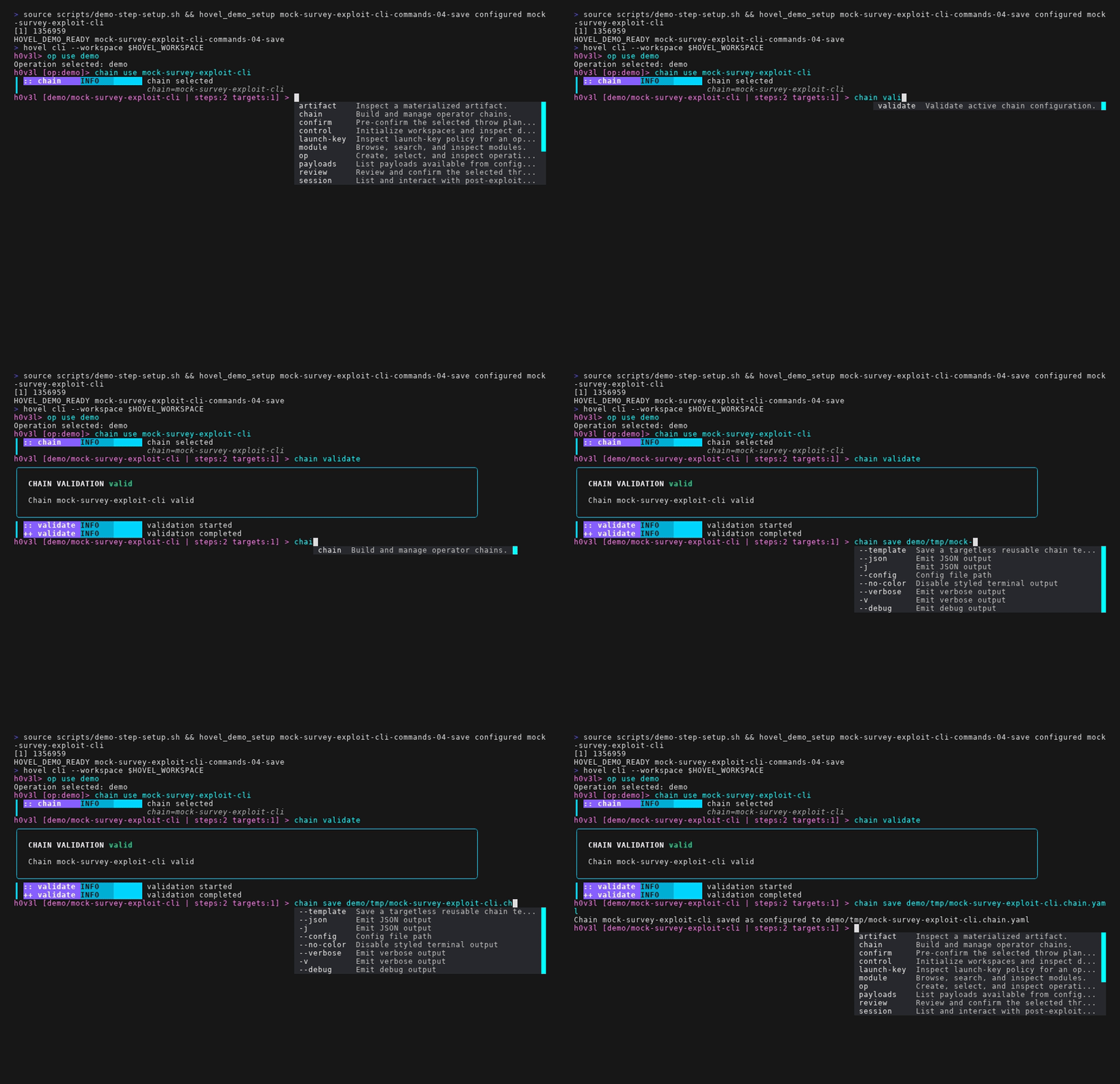
Targets belong to operations. target add in operation context only creates or updates the operation inventory; target add in chain context also binds that target to the active chain. target bind and target unbind manage chain bindings without deleting operation targets. target clear clears only the active chain binding when a chain is selected; operation-context clear requires explicit confirmation and deletes operation targets, target config, groups, and chain bindings. target set and target group name operation-owned target groups for convenience. Interactive throw uses targets from --target, --target-set/--target-group, or the active chain bindings before planning and review.
review and throw share the same review rendering. confirm records a pre-confirmation and stops. review always displays the current plan, requires the operator to type yes, records or refreshes the confirmation, and stops. throw starts execution if the current plan hash already has a matching confirmation; otherwise it shows the review, asks the operator to type yes, records the confirmation, and starts execution. Confirmations do not expire by time. They become invalid when the reviewed plan hash changes. throw --now skips the prompt but records the bypass in the confirmation record.
Chains own their operation-scoped log topic. A chain topic is addressable as operation/<operation>/chain/<chain>/logs, and chain logs shows only the logs for the active chain. In multi-client sessions, an implemented cli client and future TUI or MCP clients attached to an operation and chain subscribe to that chain topic; clients attached to the same operation and chain see the same logs, while clients attached to other chains do not see them by default.
Operational setup commands such as workspace initialization and daemon inspection must be grouped under control in the registry exposed to cli. The old top-level run command should not be the durable operator contract; throw is the execution verb for the selected chain and target set.
The visual goal is a maintainable high-contrast operator console: sharp prompt styling, clear context, readable tables, severity and status colors, and deterministic render tests. Styling should be centralized in the shared terminal theme package rather than scattered across command handlers.
TUI
The TUI is the planned visual identity of the project, but it should remain a client over hoveld. Today hovel tui is only an explicit not-implemented role.
Requirements:
- Attaches to
hoveld. - Consumes the same structured logging rail as one-shot execution,
cli, MCP, and the future API adapter. - Works over SSH.
- Degrades gracefully on limited terminals.
- Supports multiple clients attached to the same engine.
- Uses Bubble Tea, Bubbles, and Lip Gloss.
- Shares theme tokens with
climode. - Presents the same plans, confirmations, throws, sessions, listeners, artifacts, and structured events as
cli, one-shot execution, and MCP. - Managed daemon lifecycle: attach to an existing daemon if one is running; otherwise start a background daemon owned by the
tuisession and shut it down on exit.
Initial screens:
Dashboard
Module Browser
Service Browser
Throw Planner
Live Throw View
Target Matrix
Provider Browser
Payload Browser
Installed Payloads
Listener Panel
Session Panel
Artifact Viewer
Log Stream
Settings / Theme Selector
Live throw view should include:
- Chain phase timeline.
- Per-target status matrix.
- Module logs.
- Service logs.
- Listener state.
- Installed payload state.
- Session state.
- Current step details.
- Artifact count.
- Findings count.
- Error panel.
- Progress indicators.
Visual direction:
- High-contrast operator console, not a generic dashboard.
- Dense but legible layouts.
- Lip Gloss borders, tables, tabs, status bars, and severity styling.
- Built-in themes with a distinctive operator-console aesthetic, while preserving accessibility and
--no-coloror low-color fallbacks. - Keyboard-first navigation with clear focus states.
- Motion only where it clarifies live state.
Shared Command Registry
Hovel has a central command registry for shared operator commands and action metadata. Prompt-only helpers may exist in cli when they wrap registry-backed state changes.
Registering an operator action once should make it available to:
climode as an interactive command with prompt completion and contextual help.- TUI action palettes and key-bound actions where applicable.
- One-shot chain-file execution only where the action belongs to the saved-file execution workflow.
The registry owns:
- Command path and aliases.
- Short and long help text.
- Positional arguments.
- Flags, switches, and options.
- Required and optional values.
- Value parsers and validation.
- Completion providers.
- Output modes, including human output and JSON.
- Handler binding to application services or daemon RPC calls.
- Safety and confirmation metadata.
Command handlers must not parse argv directly. They receive a validated command invocation built from registry metadata. CLI mode should adapt registry metadata into go-prompt suggestions, contextual help, and validated invocations. One-shot mode should use the shared planning, confirmation, and throw services rather than reimplementing a parallel shell-only path.
Golden tests should verify CLI help and completion. Contract tests should verify that one-shot chain-file execution and interactive throw produce equivalent plans, review surfaces, confirmation records, events, artifacts, throw records, and final state for the same chain file.
REST/OpenAPI
No public REST adapter is currently implemented. The source tree does have an OpenAPI artifact for the daemon RPC because that contract is HTTP/JSON and stable; see Daemon RPC Contract. A future public REST API should be a separate adapter over application services and should be generated from source-backed types where possible.
A local web application, Elixir control plane, or other trusted client can already generate a client from the daemon OpenAPI document. A protected container deployment may connect that client directly to a configured TCP listener; TCP is read-only by default, while insecure-full requires explicit server configuration and client acknowledgement. In particular, Mesh listening posts use stable list/start/stop methods and daemon bookkeeping rather than requiring the front end to import a Mesh SDK or speak provider JSON-RPC. Any public or cross-trust-boundary API still needs its own authentication, authorization, and transport-security adapter; the daemon TCP listener is not that public boundary.
REST should not block the first useful command/CLI and event-stream loop. It may ship in the first alpha if needed for MCP or external automation, but it must remain an adapter over application services.
Primary uses:
- TUI testing.
- MCP adapter.
- External automation.
- Future web UI.
- Chain-file execution from scripts.
- Service lifecycle management.
- Mesh listening-post lifecycle plus listener and session inspection.
Recommended API groups:
/api/v1/modules
/api/v1/services
/api/v1/providers
/api/v1/payloads/available
/api/v1/payloads/installed
/api/v1/listeners
/api/v1/sessions
/api/v1/targets
/api/v1/throws
/api/v1/artifacts
/api/v1/events
Event streaming may use Server-Sent Events or WebSockets.
MCP Adapter
An initial MCP adapter is implemented as hovel mcp. It defaults to stdio, supports streamable HTTP with --transport http, accepts the same explicit --config path as other front ends, attaches to hoveld as an MCP operator entity, heartbeats while connected, and exposes typed tools for operator identity, live entity listing, operation listing, workspace snapshots, catalog snapshots, module search/inspect, chain suggestions, idempotent chain apply, launch-key policy inspection, throw plan/confirm/start, installed payload listing, typed session calls, and provider-owned payload calls.
MCP has eventual operator parity: anything a human can do through cli, one-shot execution, TUI, or API should be representable through MCP, subject to the same guardrail checks, confirmations, planning output, and audit trail. The implementation should ship inspection and planning tools before execution tools unless the shared confirmation and audit path is already complete.
MCP should be treated as a peer front end, not as a privileged back door. It may expose workflows optimized for agents, but those workflows must produce the same plans, guardrail results, confirmations, structured events, artifacts, and throw records that a CLI or TUI operator would see.
Implemented tools:
hovel_operator_identity
hovel_operator_list_entities
hovel_operation_list
hovel_workspace_snapshot
hovel_catalog_snapshot
hovel_module_search
hovel_module_inspect
hovel_chain_suggest
hovel_launch_key_policy
hovel_chain_apply
hovel_command_run
hovel_throw_plan
hovel_throw_confirm
hovel_throw_start
hovel_installed_payload_list
hovel_session_capabilities
hovel_session_call
hovel_payload_cmd
hovel_payload_capabilities
hovel_payload_call
Follow-on inspection and control tools:
hovel_service_list
hovel_service_status
hovel_throw_status
hovel_throw_logs
hovel_artifact_list
hovel_artifact_inspect
hovel_target_list
hovel_payload_inspect
hovel_listener_list
hovel_session_list
hovel_session_read
hovel_session_write
hovel_session_close
Execution tools should be added only after confirmation records and guardrail checks are shared with CLI and REST:
hovel_payload_connect
hovel_payload_cleanup
hovel_payload_mark_removed
hovel_start_service
hovel_stop_service
hovel_stream_throw_events
The MCP adapter must not expose raw dangerous operations without the same validation, scope guardrails, and audit model used by CLI and REST.